Scratch vs. Python: Which Should My Kid Start With?
This is probably the single most common question we get before a first trial session. Scratch or Python? Which one is "better"? Which one should we start with so we don't waste time on the wrong thing?
The short answer: neither is better. They're not even really competing for the same job. But that answer isn't very useful on its own, so let's actually dig into it.
What Scratch actually is
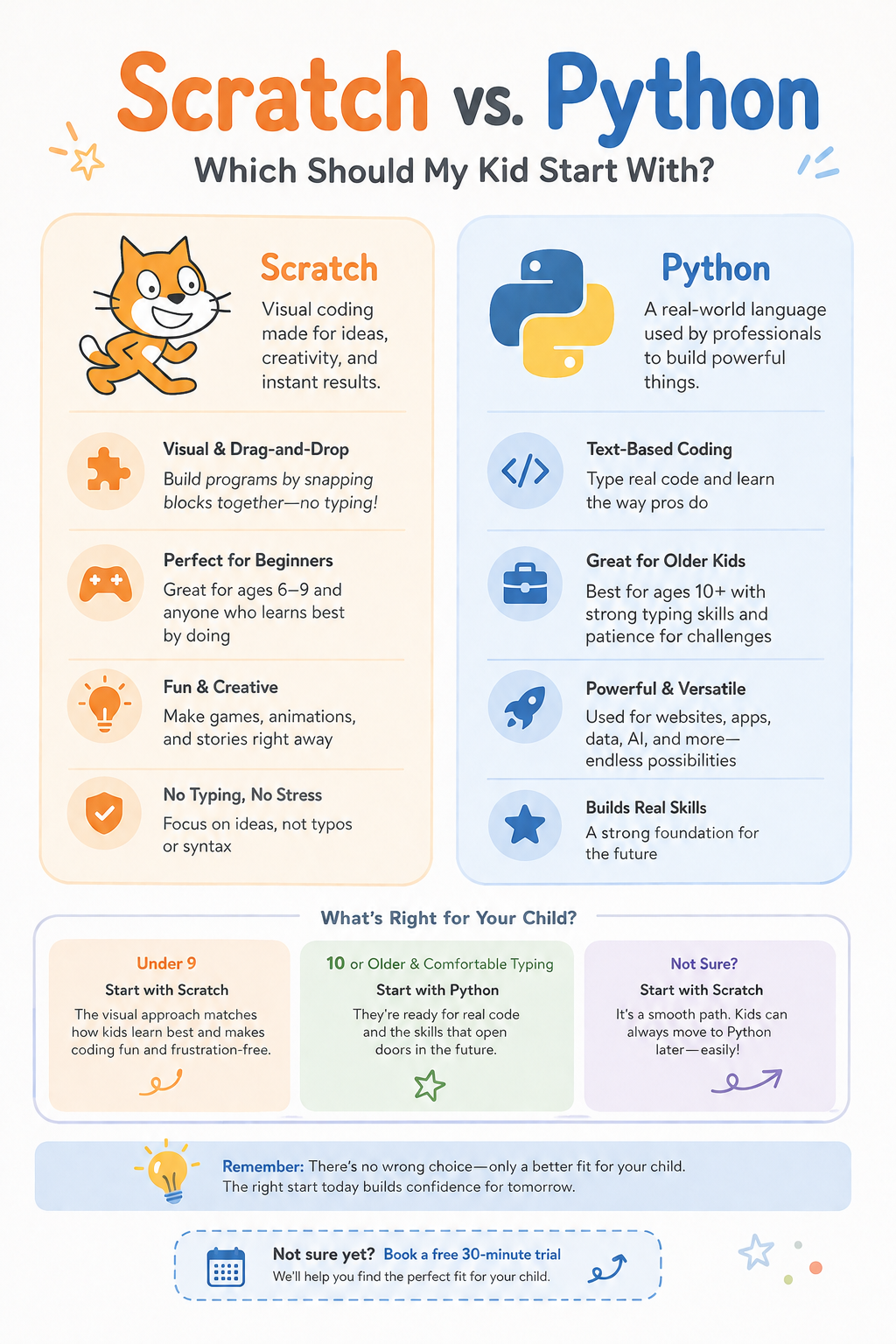
Scratch is a visual programming language built by MIT, and calling it a "kids' toy" undersells it badly. Kids build real programs — games, animations, interactive stories — by dragging and snapping together colored blocks instead of typing lines of text. A block that says "move 10 steps" clicks into a block that says "if touching edge, bounce." No semicolons. No missing brackets. No typos that quietly break everything.
That last part matters more than people expect. A five-year-old who can't yet type "if" correctly, or who spells it "iff" three times in a row and gets frustrated, still has real, working code the moment they snap two blocks together. The barrier between an idea and a working result is about as low as it gets.
We generally recommend it for kids around 6 to 9, though we've had older kids start here too, particularly ones who get anxious about "getting it wrong." There's no wrong here in the way typing-based languages can feel unforgiving.
What Python actually is
Python is not a kids' language at all. It's one of the most widely used programming languages in the world, full stop — the same one professional engineers use to build real software, analyze data, and yes, work on actual AI systems. Kids who learn Python aren't learning a simplified stand-in for "real coding." They're learning real coding, just starting with a genuinely beginner-friendly one.
That said, it does require typing actual syntax. print("Hello") has to be typed exactly right, parentheses and quotation marks included, or the program simply won't run. For a kid who's comfortable typing and reading, and who has some tolerance for "wait, why isn't this working" moments, that's not a big deal. For a kid who isn't there yet, it can turn a fun activity into a frustrating one fast.
We typically start kids on Python around 9 or 10, sometimes a bit younger if they've already spent time in Scratch and are itching for "the real thing," which happens more than you'd think. Kids notice when something feels like the training-wheels version, and some of them want off the wheels earlier than the age guideline suggests.
So which one, actually
Age is a decent starting filter but it's not the real question. Ask this instead: how does your child handle typing, and how do they handle small failures?
If they're under 9, start with Scratch. This isn't really up for debate at that age — the visual format matches where most kids are developmentally, and there's nothing lost by starting there even if they'll move to Python eventually.
If they're 10 or older and comfortable typing, Python is usually a strong direct entry point. You don't need to "graduate" through Scratch first if your kid is already past the age and comfort level where Scratch's main advantages apply.
If they're somewhere in between, or you genuinely aren't sure, lean toward Scratch anyway. Moving from Scratch into Python later is a smooth, well-worn path. Kids arrive at Python already understanding loops, conditionals, and sequencing conceptually, so the transition is mostly "oh, this is the same idea, just typed differently." Going the other direction almost never happens, because there's no real reason to.
A wrinkle worth mentioning
A few kids just prefer one format over the other regardless of age, and that preference is worth listening to. We've taught 8-year-olds who found Scratch's drag-and-drop interface fiddly and annoying compared to just typing what they meant, and did noticeably better once we moved them into a very gentle introductory Python track. We've also taught 12-year-olds who loved Scratch's visual, game-like feel and stuck with it far longer than the "typical" age range would suggest, building increasingly ambitious projects the whole time.
If your child has already had exposure to either one, ask them which felt more fun rather than which felt easier. Fun tends to predict whether they stick with it. Easy doesn't always.
What we actually do in a free trial
Rather than making you guess, our free 30-minute trial is built around exactly this question. A mentor spends real time with your child, gets a sense of how they think, what frustrates them, what excites them, and gives you a specific recommendation, not a generic age bracket. Sometimes that recommendation surprises parents. A six-year-old who's shown real reading fluency and a stubborn streak about "doing it the real way" might start in a very gentle Python introduction. A twelve-year-old who's never coded before but seems overwhelmed by the idea of typing exact syntax might do better easing in through Scratch first, regardless of what their age would normally suggest.
There isn't a wrong answer here, only a better-fit and worse-fit one for your specific kid. That's really the whole point of starting with a conversation instead of a chart.
Curious which track your child would land in? Book a free trial and find out directly, or take a closer look at Scratch Game Design and Python for Beginners to see the full curriculum for each.
Ready to see your child build something real?
Book Free Trial